10 Digitizing Tips for Cleaner Embroidery in PE-Design
Auto-digitizing gives a fast start, but a few manual adjustments make the difference between “home-made” and professional embroidery. These tips apply to PE-Design 11, 10 and earlier versions.
1. Start with clean artwork
Use high-contrast images with few colours. Clean up noise before running Auto Punch.
2. Do not over-density
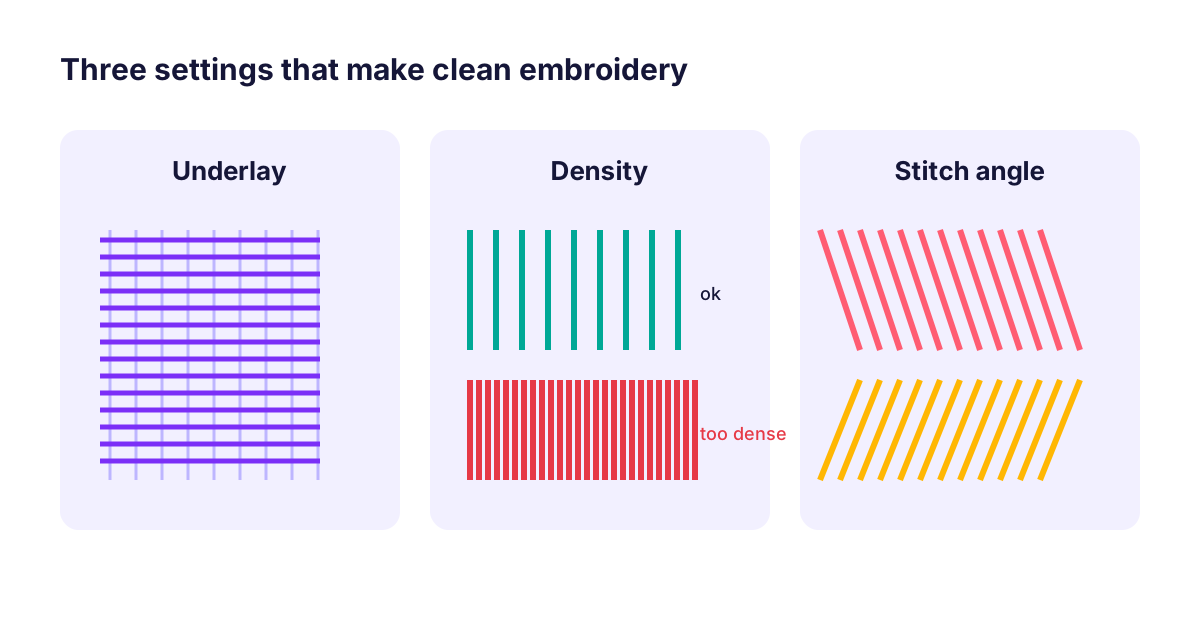
Too many stitches cause stiff, bulletproof embroidery and puckering. Use the default density first and only increase it for very thin threads.
3. Always use underlay
Underlay stabilizes the fabric and supports the top stitches. Use edge-run underlay for satin columns and zigzag or grid underlay for fills.
4. Add pull compensation
Stitches pull fabric inwards. Slightly widening satin columns keeps shapes and letters at the right size.
5. Vary stitch direction
Neighbouring fill areas with different angles reflect light differently and look more defined.
6. Small lettering needs special care
For text under about 6 mm high, use a small-text font and avoid fills. Increase letter spacing slightly.
7. Plan stitch order
Stitch from the centre outwards and from background to foreground. Group same-colour areas to reduce thread changes.
8. Reduce jumps and trims
Connect nearby objects and reorder them so the machine travels less.
9. Match stabilizer to fabric
Cut-away for knits and dense designs, tear-away for stable woven fabric, water-soluble topping for towels and fleece.
10. Test, adjust, repeat
Stitch a sample, note what went wrong and adjust one setting at a time. Save versions of your design so you can compare results.
FAQ
Why does my embroidery pucker?
Usually too much density, missing underlay or a stabilizer that is too light for the fabric.
What is the minimum text size for embroidery?
Around 5–6 mm cap height for readable satin lettering; smaller text needs special small fonts and running stitches.